
To determine the quality of a speaker, you can use the ohmmeter of a multimeter for testing. When conducting the test, place the speaker with the opening facing down flat on the table, set the multimeter to the R×1 range, and intermittently touch the two probes (regardless of positive or negative) to the two leads of the speaker or headphones, as shown in Figure 9-7. A "click, click..." sound should be emitted from the speaker or headphones. The louder the sound, the higher the sensitivity of the speaker. If the sound is very faint and the oscillation amplitude of the multimeter pointer is also small, it indicates poor performance and may be due to a local short circuit in the voice coil (a decrease in induced electromotive force). If the speaker is silent and the multimeter pointer does not move, it may be that the lead wire is broken or the voice coil is burned out. If the speaker is silent but the multimeter pointer is swinging, it indicates that the voice coil lead is good, but the voice coil is stuck and does not move.
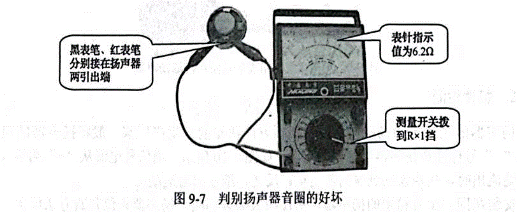
To determine the quality of a speaker, you can use the ohmmeter of a multimeter for testing. When conducting the test, place the speaker with the opening facing down flat on the table, set the multimeter to the R×1 range, and intermittently touch the two probes (regardless of positive or negative) to the two leads of the speaker or headphones, as shown in Figure 9-7. A "click, click..." sound should be emitted from the speaker or headphones. The louder the sound, the higher the sensitivity of the speaker. If the sound is very faint and the oscillation amplitude of the multimeter pointer is also small, it indicates poor performance and may be due to a local short circuit in the voice coil (a decrease in induced electromotive force). If the speaker is silent and the multimeter pointer does not move, it may be that the lead wire is broken or the voice coil is burned out. If the speaker is silent but the multimeter pointer is swinging, it indicates that the voice coil lead is good, but the voice coil is stuck and does not move.
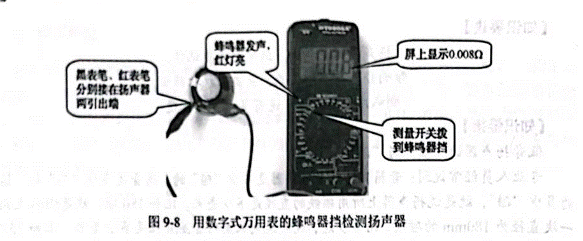
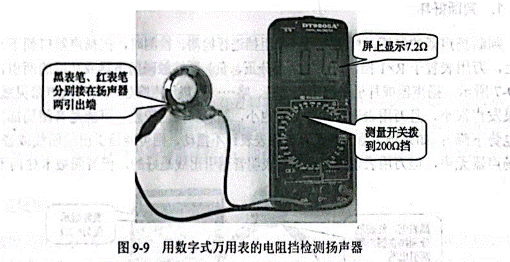
The operation method of detecting the speaker with the ohmmeter of a digital multimeter is shown in Figure 9-9. Set the digital multimeter to the 2002 range of the ohmmeter, connect the two test leads to the two terminals of the speaker, and at this time, the multimeter will display the DC copper resistance of the speaker under test. This value is related to the impedance of the speaker. The DC copper resistance of a general electric speaker is approximately 80% to 90% of its nominal impedance. If the multimeter shows the overflow symbol "1" during the test, it indicates that the voice coil of the speaker under test has an open circuit.
Polarity detection
The polarity of a speaker is determined by the winding direction of the speaker's voice coil. Manufacturers usually mark the polarity of the speaker with "+" and "-" signs beside the speaker's wiring terminals, as shown in Figure 9-10. When the signal current flows in from the "+" end and out from the "-" end, the paper cone of the speaker moves forward. Conversely, the paper basin moves backward.
Speakers installed in the same speaker box must be connected to the same polarity. The method for determining the phase of a speaker is as follows: Place the speaker with the opening facing upwards, set the multimeter to the "DC 50uA" range, connect the two test leads to the two terminals of the speaker respectively, and gently press the paper basin down with your hand. At the moment of pressing down, if the hands deflect to the right, the black test lead is connected to the "+" end of the speaker, and the red test lead is connected to the "-" end of the speaker, as shown in Figure 9-11.
免责声明: 本文章转自其它平台,并不代表本站观点及立场。若有侵权或异议,请联系我们删除。谢谢! Disclaimer: This article is reproduced from other platforms and does not represent the views or positions of this website. If there is any infringement or objection, please contact us to delete it. thank you! |

WeChat Official Account

WeChat Service
 Email
Email QQ
QQ 13823761625
